Confirmation
PCR Downtime Procedures (when Siren is completely unavailable)
What if our Toughbook isn't working properly during a call?
If your Toughbook is not functioning properly during a call, you will need to document the event using a Siren Downtime PCR (Form EHS0184).
Where can I find Siren Downtime PCRs?
Siren Downtime PCRs are stored on ALL ambulances. Unit Chiefs will order/re-order the downtime form through the standard BCEHS forms supply processes (Form EHS0184 2018 0624).
How is the Siren Downtime PCR different than the old paper PCR?
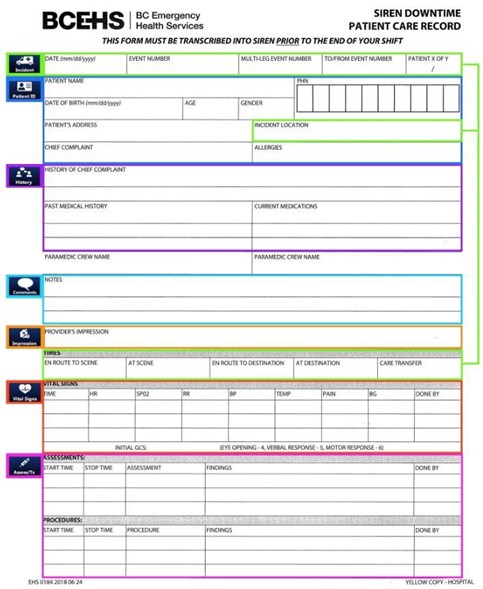
The Siren Downtime PCR does not have the same detail as the old paper PCR. The Siren Downtime PCR allows you to capture only the most clinically pertinent information when a Toughbook is not available. The Siren Downtime Forms contain the most pertinent event information and easily match to information found in Siren. This image of the Siren Downtime PCR highlights what tab within Siren the event information will be recorded:

What do I do with a Siren Downtime PCR that I have completed?
Siren is available on all BCEHS station computers for downtime documentation. When back at the station, you will enter the information you recorded on the Siren Downtime PCR into Siren using a station computer, after the call has been documented in Siren- the Downtime Form may be disposed in a confidential recycling bin/ shredder.
What happens to paper PCRs that I produce?
The paper PCR will not be a valid form of documentation and will not be collected for any processing. All paper PCRs used are required to be transcribed into Siren.